TACHYONDLP 1.0

Controls the leakage path of important information inside the company and applies security policies. This is an information leak prevention product.

Product Overview

An endpoint-based information leak prevention solution that controls offline leakage channels.

TACHYON DLPIt identifies internal information and provides protection measures such as encryption. Controls the export of unauthorized files through media, programs, output, and web uploads.

Detection and identification of personal/sensitive information
  • Identification of key information within the organization based on regular expressions and keywords
  • Detect and manage personal information and sensitive information files
Protection measures
  • Protection of personal and sensitive information identification files and files that need to be prevented from being leaked
  • Policy-based protection measures such as encryption, isolation, and deletion
Enhanced media control system
  • Wireless LAN, data cable, storage media Control
  • Support for exception handling and smartphone tethering blocking policy
Output management
  • Block document output and manage output approval
  • Watermark and output Log-based security control

Key Features

Manage everything from personal information detection to export control at once

Personal and sensitive information inspection

Personal information and sensitive information files existing on the PC and storage are identified using regular expressions, keywords, and scheduled inspection criteria.
  • All/selected/real-time/scheduled inspection
  • Duplicate detection and exception file management
  • Detect patterns such as resident registration number and passport number

Prevent data leakage

Unauthorized export routes are controlled to prevent important data from moving outside.

  • Block file export
  • Website upload blocking
  • Control shared folders and external storage media

Media control

Storage media and network media connected to the work environment are allowed and blocked based on policy.

  • Windows·macOS media control
  • USB and general storage device control
  • Wireless LAN/tethering blocking policy

Output management

Manage output routes and approval procedures to reduce information leakage due to document output.

  • Blocks personal information document output
  • Administrator approval process
  • Watermark and output log Creation

Key Benefits

Inspection of personal/sensitive information and blocking of leakage routes

Personal and sensitive information inspection

Identifies and manages files containing sensitive information based on regular expressions and keywords.

Control file export

Main export paths such as media, web uploads, and shared folders are blocked by policy.

Automate protective measures

Protective measures such as encryption, quarantine, and deletion are applied to detected files.

Media/network control

Controls external paths such as USB, wireless LAN, tethering, and data cables.

Output security control

Manage the risk of document leakage with output approval, watermark, and output log.

Approval/log management

Export approval and action history are tracked in the central console and used as audit basis.

Key Benefits

Integrated check of policy and status in management console

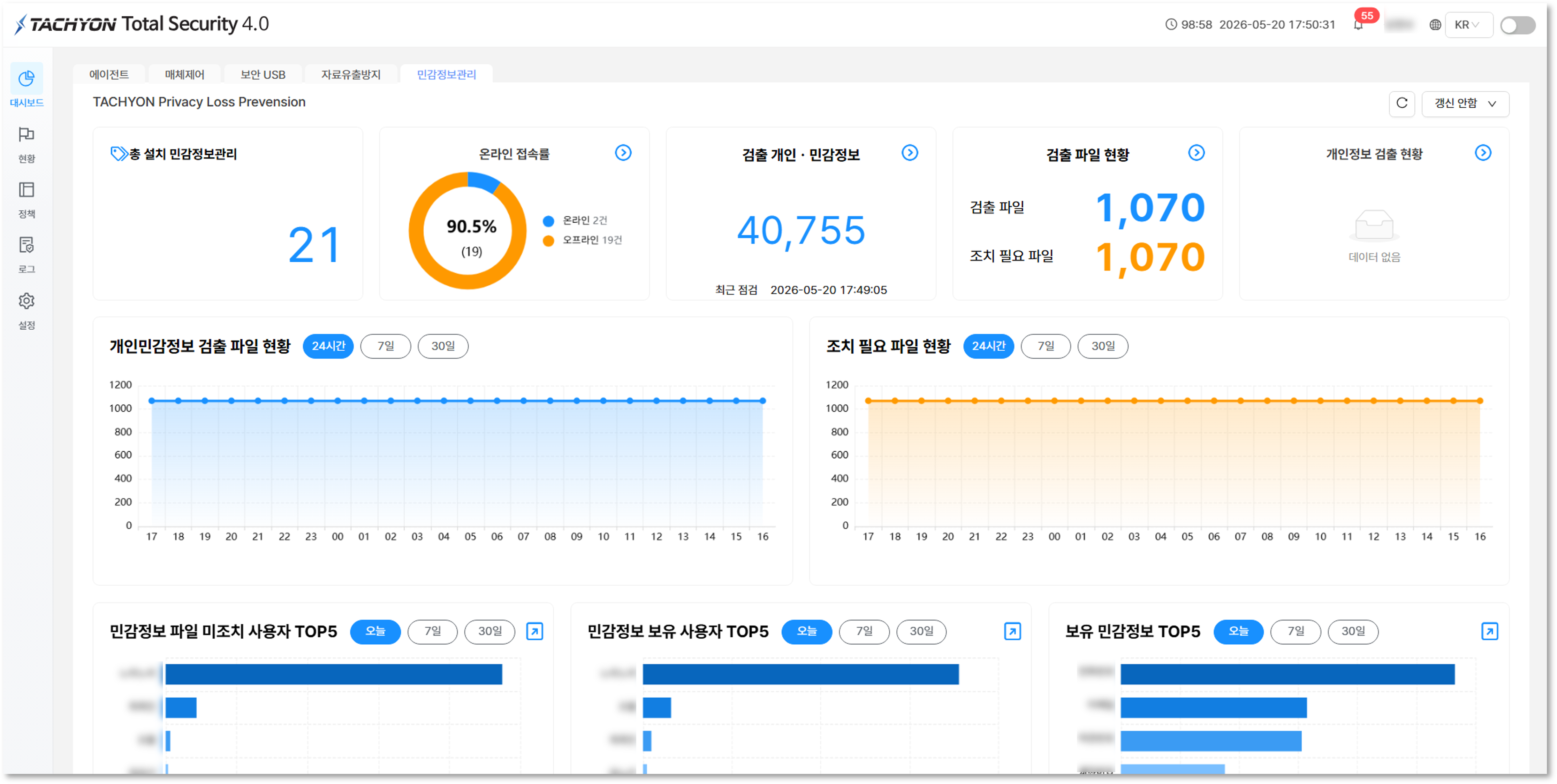
TACHYON DLP Sensitive information management dashboard
Sensitive information management
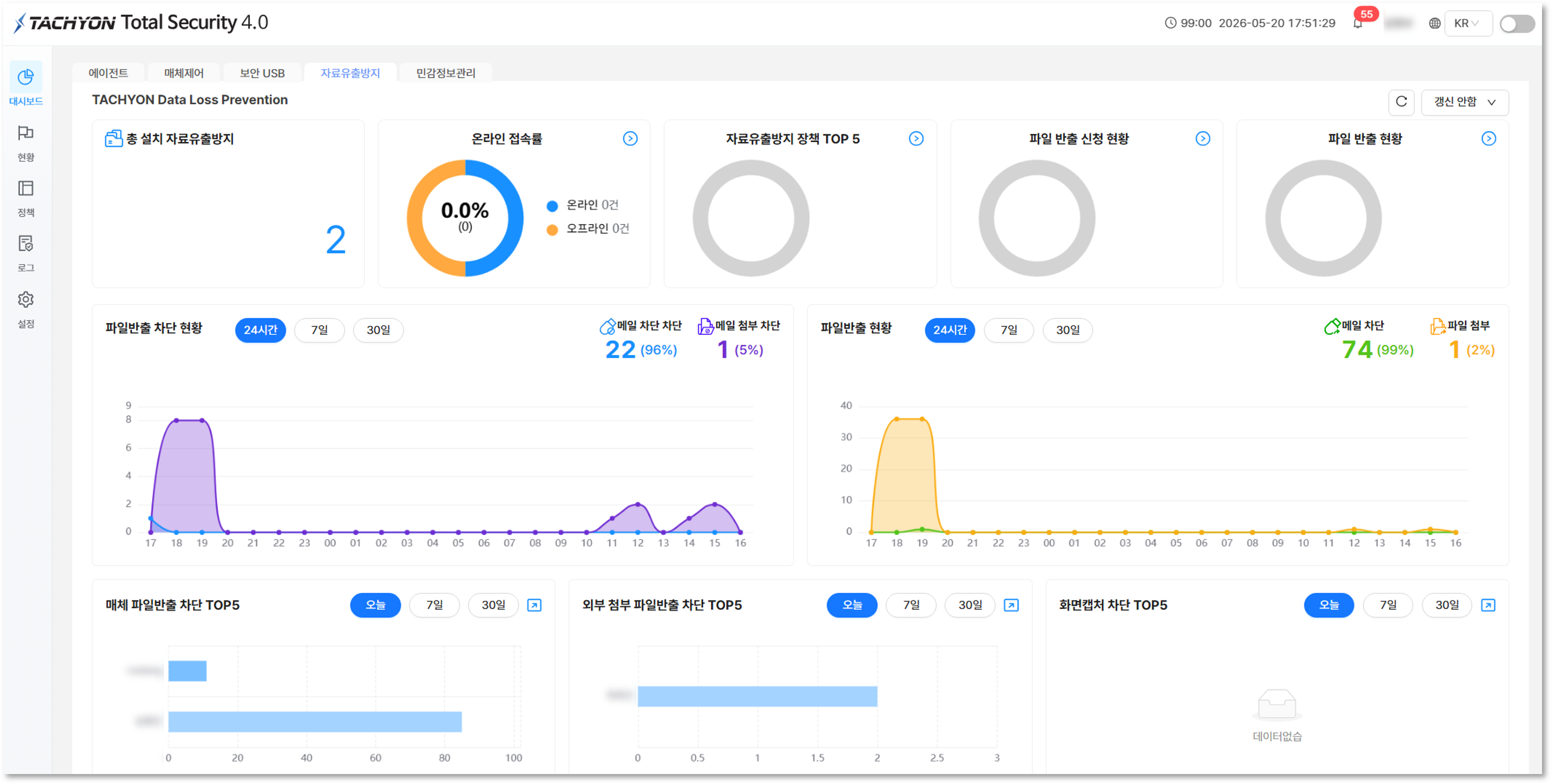
TACHYON DLP data leak prevention dashboard
Data leak prevention

System Requirements

Configuration considering server and user terminal environments

Management server

Rocky Linux-based management server configuration

  1. Rocky Linux 9.2
  2. Intel 8 Core CPU 3.0GHz or higher
  3. RAM 32GB or more
  4. HDD 1TB or more
  5. 1000Mbps Ethernet recommended
User terminal

Windows/macOS user terminal support

  1. Windows 10/11
  2. macOS Big Sur or higher
  3. Intel Quad Core 2.4GHz or higher
  4. RAM 8GB or more
  5. Edge/Chrome support
Operating policy

Pre-define control standards tailored to organizational policy

  1. Definition of inspection scope by department
  2. Export approval procedure settings
  3. Cleans up storage media exception criteria
  4. Apply output management standards
Check points before introductionIt is recommended that leak control policies be applied after first organizing exception criteria, approval systems, and storage media use standards for each organization/department/job.